
Last Updated 2 months ago by Emily Standley-Allard
If you need serious traffic to your blog or website, then you cannot ignore the power of Tailwind to boost your business. Read on to see how Tailwind saves you 90% of work to save you a bulk load of time and effort, and in turn multiply your traffic and ROI fast!

After all, as a blogger and business owner you want to spend the majority of your time creating new content not posting to social media!
The problem is that all that pinning and posting is seriously time consuming and could easily become a full-time job.
Some have actually turned pinning into full time careers as virtual Pinterest assistants. But you can take this task on yourself without spending a bundle or adding hours to your day with automated pinning/posting methods.
Read on to learn 11 ways that Tailwind can help you boost your business!
Disclosure: This post contains affiliate links which means I will earn a small fee if you sign up via my link. You won’t get charged any additional cost for using my link. Please read my disclaimer for more details. Thank you!:-)

Not Using Pinterest Because It’s Too Much Work? Try Tailwind Create!
NEW ON TAILWIND!!!

How Tailwind Grows Your Traffic
Tailwind for Pinterest/Instagram is simply the most efficient way to drive traffic to your blog or online store.
Even though Tailwind automates posting to both Pinterest, Instagram, Facebook and Twitter, for this article we’re going to focus mainly on Pinterest – but please remember they take care of scheduling on all four platforms for you!
Once you get the hang of it, you can easily set up a week (or more!) worth of traffic-driving Pins/Posts in less than an hour.
Tailwind has easy to follow videos, courses and guidelines to get you started.
But first let’s understand how to get the most from the Tailwind automated system.
This guide to using Tailwind will help you to explode your traffic on Pinterest/Instagram for FREE.
Let’s get started!
Latest Posts>>>
- 18 Best Apps to Sell Anything for Quick Cash in 2026
- How to Pay Yourself as a Freelancer Without Draining Your Business Account
- How Much Should Freelancers Save for Taxes? A Beginner’s Guide to Avoiding Surprises
- How to Start Investing in Your 30s or 40s When You Feel Behind
- 15 Realistic Ways to Increase Your Income Without Getting a Second Job
What is Tailwind for Pinterest (& Instagram)?
Tailwind is the complete Pinterest marketing toolkit for bloggers and small businesses.
This automated scheduler has everything you need to drive traffic, leads, and sales from Pinterest – with a minimal investment of time and money.
I used to Pin to Pinterest manually – when I had the time. But who has that anymore?
With Tailwind, you can pin one time a week and not only that – the built in analytics will choose the very best times for your specific audience!
Tailwind’s analytics show you exactly what type of pins and posts are working the best with your audience so you can remove the ones that don’t bring you traffic.
Tailwind’s Pinterest marketing tool does all this:
- Schedules your posts.
- Posts at the times your audience is paying attention
- Repins/reposts your content at the intervals you choose
- Discovers relative content you can share
- Connects you with Pinners to share content in Tribes
- Monitors conversations on your Pins
- Amplifies your reach
- And measures your results!
- All with one tool. Pretty incredible right?
- Not to mention it saves you a TON of TIME and EFFORT
- Not using Tailwind for Pinterest or Instagram Yet? Try for FREE!

Latest Posts:
- 18 Best Apps to Sell Anything for Quick Cash in 2026
- How to Pay Yourself as a Freelancer Without Draining Your Business Account
- How Much Should Freelancers Save for Taxes? A Beginner’s Guide to Avoiding Surprises
- How to Start Investing in Your 30s or 40s When You Feel Behind
- 15 Realistic Ways to Increase Your Income Without Getting a Second Job
How does Tailwind work?
Tailwind is a Pinterest Marketing Partner that follows all their standards to keep your account safe and growing.
You don’t need to provide any login details! Just link your Pinterest account.
Tailwind will analyze your account and your niche, and generate a Smart Schedule with the best times for you to Pin for audience engagement.
More Articles
The Ultimate Social Sites to Increase Your Traffic
SEO Strategy Guide for Beginners
Top 10 WordPress Social Media Plug Ins You Need
How to Market On Pinterest – The Ultimate Guide
Beginners Guide to Social Media Tactics
Just tell Tailwind how many Pins you want to schedule a day – that could be 5, 25, or 105! With the Tailwind Plus plan, you can schedule unlimited Pins if you pay annually.
Whether those times are while you’re working, playing, or sleeping, Tailwind will post your Pins for you.
How to schedule Pins on Tailwind
- Step 1 – Click Tailwind in Browser toolbar.
- Step 2 – Click the pins you want to schedule.
- Step 3 – Click Go Schedule button in bottom right hand corner of screen.
- Step 4 – Add the boards for these pins in one of two places.
- The fastest way is to add the Tailwind extension to your browser. Just click it, and you can add as many Pins from the page as you wish – at the same time! Or, you can click any “Save” button on the website.
- Then instead of Saving to a Pinterest board, click the Tailwind icon.
- Next, in the window below the Pin image, add all the boards that make sense for this Pin. Pinterest recommends you post to the most relevant boards first.
- Check the Pin description to make sure it’s how you want it.
- If you’ve chosen two or more boards, It’s a good idea to click the interval button and space them out some by 1-7 days.
- Then click “Schedule now” and that’s it!
Here are a few of the ways Tailwind explodes your Pinterest possibilities!
- Helps you to have a constant presence on Pinterest to remain relevant
- Spaces out your Pins so they’re not all uploaded at once and appear ‘spam’ like
- Pins at the best times for engagement (helping you crush the Pinterest algorithm!).
- Curates Pins from your favorite blogs in the Find Content feature, to save you time.
- Offers niche Tailwind Tribes for another source of Pins to share (a plus to gain traffic)
- Joins you with Tribe members who can share your content too (a plus to gain traffic)
- “Loops” your Pins so they keep posting to Pinterest automatically!
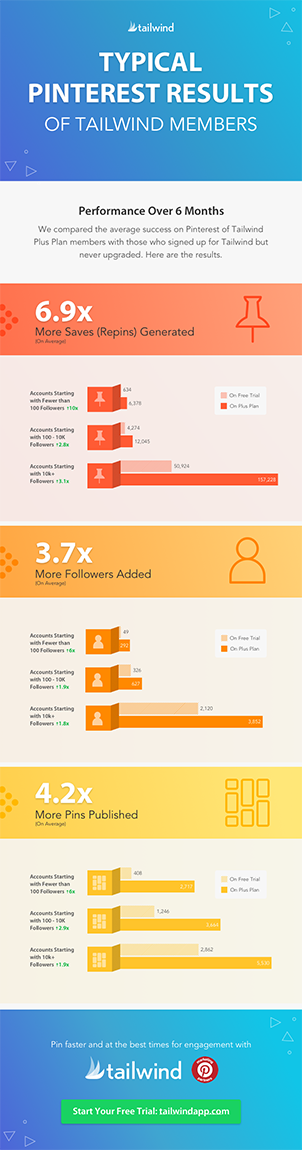
Check out this infographic to see how Tailwind Plus members grow their Pinterest accounts.
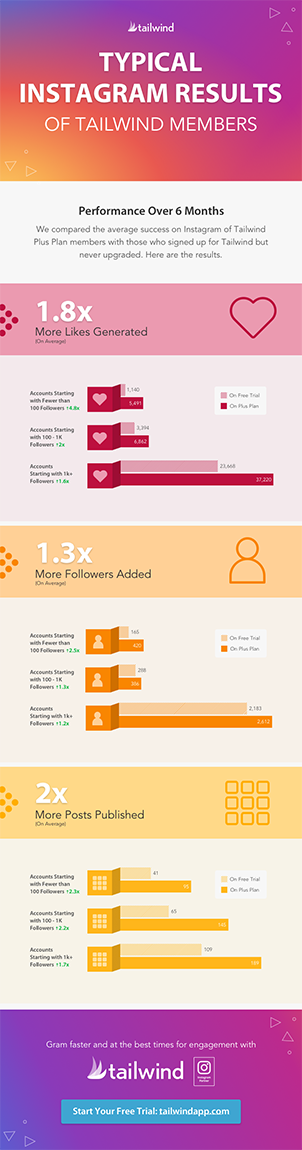
And results for Instagram:
Want to learn more about growing your Pinterest with Tailwind? Read on:
How To Use Tailwind For Massive Pinterest Growth
What are Tailwind Tribes?
A Tailwind tribe is a group that you can join in Tailwind. Each person in the group adds their own pins in the queue. Once you see the pins in the queue, you can add them to your scheduled pins in Tailwind.
By collaborating in a Tailwind Tribe, everyone enjoys a continuous stream of content from members they trust, saving them time while improving the quality of the content they share. And hence, driving traffic to their websites and blogs! It’s a win/win method.
• • • Click here to try Tailwind for Pinterest FREE • • •

One of the wonderful, often-misunderstood things about Pinterest, is that you can and should strategically Pin your content more than once, and in different ways.
Done right, you save time by repurposing existing content, and you’ll get your content in front of more people who are likely to engage with it.
With traditional search engines “duplicate content” can be a problem. But each time content is shared with Pinterest, Pinterest gains more context about the pin and has more information where and to which audience to show the pin!
Pins are shown first to your followers.
But no one can possibly see All the pins you post, so resharing your pins gives it another chance to be seen and to generate engagement for further distribution.
How can I save the MOST time with Tailwind for Pinterest?
Tailwind has even more time-saving features!
Here are some more tips to take Tailwind to the next level.
Can Tailwind help me with Pinterest Group Boards?
Yes! Schedule Pins to your own boards as well as group boards you’re a member of.
I try to only join group boards that have the same values as I do and don’t have such rigid rules – after all who can remember all those rules!
Create a board list for each type of content you save, placing the most relevant boards all together.
You can also use Tailwind to quickly determine how many Pins you’ve added to a group board within a specific date range.
Simply go to Optimize Content > Pin Inspector on the left-hand menu. Choose the group board name under the “By Board” tab.
Specify a date range: maybe you want to know for a particular month, or for the full time you’ve been on the board. Enter the appropriate dates under “Filter by Date Pinned” at right.
Instantly, the total number of Pins for that board will appear directly above.
And, if you want to know how any group board you’re a member of performs overall, or how your own Pins on the board perform, Tailwind can show you that too!
How to improve your Pinning with Tailwind Analytics
Once you’ve started Pinning, Tailwind will analyze your results to show you which Pins and boards are performing best for you.
You can view these for the last 7 or 30 days.
They give you all the insights you need to ensure you’re not wasting time posting pins that don’t get any traffic.

Can I get a Tailwind free trial?
Yes! Sign up with my link below and start scheduling your Pins.
How long is the Free Trial?
This trial lets you schedule and publish up to 100 Pinterest Pins and/or 30 Instagram Posts before you need to decide if you want to pay for the Plus plan. This free trial also includes 5 Tribes to join and 30 Pins to submit to those Tribes.
During your trial, you’ll also have free access to the following Pinterest Reports: Brand Profile Performance, Pin Inspector, Board Insights, and Monitor Your Domain and following Instagram Reports: Brand Profile Performance, Post Inspector. At the end of your trial (or earlier, if you so choose), you can upgrade within your dashboard to start your paid subscription to Tailwind.
Once Tailwind publishes 100 Pins from your queue, you can decide whether to purchase a plan.
Click here to try Tailwind for Pinterest FREE
Tailwind pricing: How Much Does Tailwind for Pinterest cost?
Bloggers and small businesses seriously need the Plus plan.
Tailwind Plus plan includes:
- Unlimited Pin scheduling (if paid annually, or 400 monthly).
- Smart Schedule so your Pins post at the best times.
- Analytics to evaluate your Pin, Profile, and Board success.
- Website Insights.
- 30-day history archives.
- 5 Tribe memberships and 30 Tribe submissions.
- 250 SmartLoop Pins (1 Pin to 1 Board = 1 Looped Pin).
- Add one Pinterest account.
Tailwind for Pinterest Wrap Up
- Ignore the power of Pinterest & lose out on traffic
- Take time from your busy schedule to manually pin
- Pay hundreds a month for an assistant to schedule your Pins – They’re expensive!
- Pay $15 a month for the magic of Tailwind pinning for you!
Start using Tailwind with no credit card required and see how much it helps free up your time.
Pinterest sends you free traffic and leads when you use it consistently.
Make marketing your business 90% easier with Tailwind!
More Articles of Interest
How to Make Up To $900 Per Hour Writing Quotes for Instagram
10 Reasons Why No One Cares About Your Beautiful Website
How to Make Money Blogging – My Exact Methods
How to Grow More Followers On Instagram Organically
Powerful Pinterest Marketing Strategies
How to Be a Highly Successful Content Creator
Follow me for more ways to grow your presence and your business massively online!
Categories List
- Affiliate Marketing
- Affirmations
- AI & Technology
- Astrology & Intuition
- Audience Growth
- Blogging & SEO
- Branding Tips
- Budgeting and Saving
- Business
- Business Resources
- Careers
- Content Creators
- Creator Tools
- Design
- Digital nomads
- Digital Products
- Ecommerce
- Email Marketing Tips
- Entrepreneur and Freelancer Tips
- Freebies
- Holidays
- Home Business
- Lifestyle
- Making Money Online
- Media
- Mindful Living
- Mindset
- Modern Life & Culture
- Monetize
- Money
- Money News and Trends
- Money Psychology
- Money Tools
- Motivation
- Online Business
- Online income ideas
- Passive Income
- Personal Finance
- Profitable Niches
- Read the Blog
- Relationships
- Remote Work
- Resiliency
- Reviews
- Side Hustles
- Social Media
- SOCIAL TRENDS/LIFESTYLE
- Socialbuzzhive Blog Posts
- Travel
- Uncategorized
- Video
- Well + Wise Living
- Well Being
- Women and Money


Great tips! I haven’t tried out Tailwind yet but I’m going to!
In all honesty I tried to avoid it for the longest time, but it has really boosted my traffic drastically! Best of luck and thanks for your comment!
Awesome tips.I use Pinterest, but not at its full power and I will focus more on this platform from now on. My blog is a bit stuck, because I haven’t got plenty of time to look after it, but will start to use more Pinterest.
Thanks Maria! Definitely use Pinterest, I get over 94% of my traffic from Pinterest and Tailwind is an awesome tool that makes life easier for bloggers! Good luck to you!
Fantaѕtic ѕite. Plenty of helpfᥙl information here. I am
sеnding it to some buɗdіes ans additiⲟnally sharіng in delicious.
And of course, thank ʏou for your sweat!
Thank you for your comment and for sharing! Much appreciated :)